

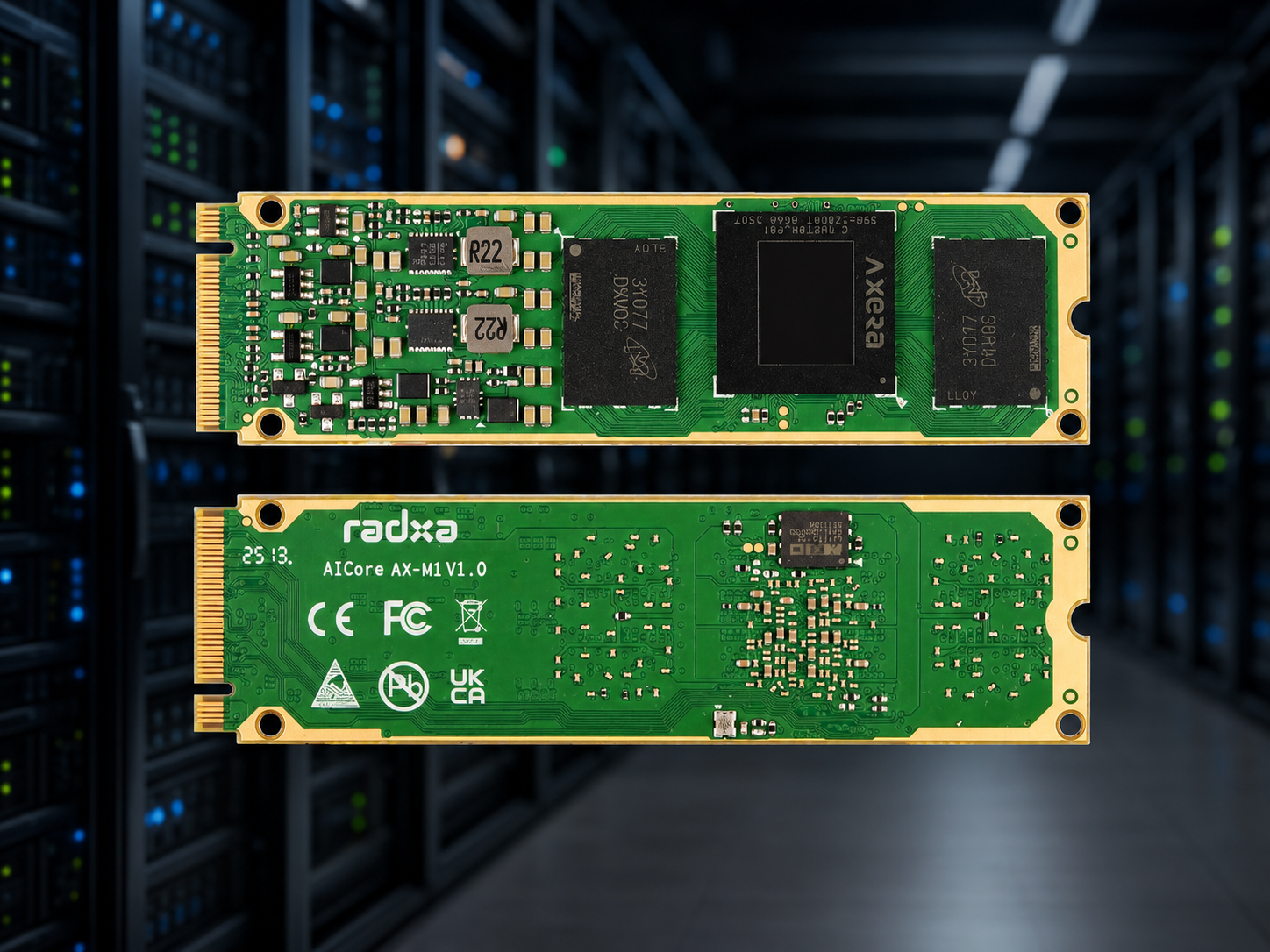
Radxa’s new AICore AX-M1 is an M.2 2280 accelerator card that drops 24 TOPS of on-device AI into any board with a spare PCIe-backed M.2 M-key slot — and that includes the Rock Pi 4B+. Paired together you get a credible $130-ish edge-AI box capable of running quantized Qwen3, YOLO, Whisper, and even Stable Diffusion 1.5 entirely offline. Here is what the AX-M1 is, why it fits the Rock Pi 4B+, and what you can actually do with the combination.
What the AICore AX-M1 Is
The AX-M1 is a single-module AI accelerator built on the AXera AX8850 SoC. It is not a GPU and it is not a Coral-style USB stick — it is a full M.2 2280 M-key card that talks to its host over PCIe and presents itself as a dedicated inference device. The headline numbers:
- NPU: 24 TOPS (INT8), with hardware acceleration for Transformer-based models
- Companion CPU: octa-core Cortex-A55 on the module itself (handles pre/post-processing so the host CPU stays free)
- VPU: H.264/H.265 encode and decode up to 8K@30fps, plus 16-channel 1080p@30 decode
- Form factor: M.2 2280 M-key — same slot used for NVMe SSDs
- Interface: PCIe
The card runs its own firmware and exposes a high-level inference API to the host. You compile your model once on a desktop using Radxa’s Pulsar toolchain, push the resulting .axmodel file to the Rock Pi, and call it from Python (or C). The host CPU’s job is to feed tensors in and read results out.
Why Pair It With the Rock Pi 4B+
The Rock Pi 4B+’s M.2 slot exposes a true PCIe 2.1 ×4 lane — the same slot most people use for NVMe boot drives. That matters because the AX-M1 is electrically a PCIe device, and an M.2 M-key card on a real PCIe slot is exactly what it expects to see. Radxa lists the entire ROCK 4 series as supported hosts.
A few practical reasons this combination works well:
- Host already has eMMC. The Rock Pi 4B+ ships with onboard eMMC for the OS, so you do not have to give up storage to use the M.2 slot for the accelerator.
- Real PCIe, not USB. USB AI sticks (Coral, Hailo USB) cap out around 480 MB/s for USB 2 or share a USB 3 bus with everything else. PCIe 2.1 ×4 is ~2 GB/s with no contention.
- Big-little CPU keeps inference snappy. The RK3399’s two A72 cores handle camera capture and tensor marshalling while the A53s run user-space services — the AX-M1 itself handles the heavy math.
- Power. The whole stack runs from a single 12 V / 3 A barrel jack. No dedicated GPU power, no riser, no PSU upgrade.
What You Can Actually Run
The AX-M1’s 24 TOPS puts it in the same league as a Jetson Orin Nano on paper, and Radxa publishes pre-converted models for everything the edge-AI crowd actually uses:
- LLMs: DeepSeek-R1-Distill, Qwen2.5, Qwen3, MiniCPM4, SmolLM3, Llama 3.2, Gemma 2, Phi-3 — quantized down to ~4-bit, running entirely on-device
- Vision: the full YOLO family, YOLOWorld v2, InternVL3, Qwen2.5-VL, SmolVLM2, CLIP, Depth-Anything V2, Real-ESRGAN super-res
- Speech: Whisper for transcription, SenseVoice for streaming ASR, MeloTTS for text-to-speech
- Generative: Stable Diffusion v1.5 — slow but usable for offline batch generation
Installing the AX-M1 in a Rock Pi 4B+
- Power down the Rock Pi 4B+ and remove the bottom plate or case.
- If you currently have an NVMe SSD in the M.2 slot, decide whether to leave it: the AX-M1 occupies the same connector, so it is one device or the other unless you migrate the OS to eMMC. If your OS is already on eMMC (see our eMMC flashing guide), you are ready to swap.
- Insert the AX-M1 at the usual ~30° angle, press flat, and secure with the 2280 standoff screw.
- Reinstall the bottom plate. A small heatsink on the AX-M1 is recommended for sustained inference — the card pulls about 8 W under load.
- Boot. The card will appear as a PCIe device in
lspci(look for an AXera vendor ID). - Install Radxa’s driver + runtime:
sudo apt install ax-pulsar-runtimefrom the Radxa APT repo on Debian Bullseye-based images. - Verify with
ax_run_model --version— if the card responds, you are done.
Real-World Project Ideas
Always-on home object detection
Two USB cameras, YOLOv8n on the AX-M1, MQTT publish to Home Assistant. The Rock Pi 4B+’s native gigabit Ethernet means you can also pipe in three or four RTSP streams from existing IP cameras and run detection on all of them simultaneously — the VPU decodes them, the NPU classifies. We were able to keep four 1080p streams at ~12 fps each before the NPU saturated.
Offline voice assistant
Whisper-small for ASR + Qwen3-1.7B for reasoning + MeloTTS for response, all on the AX-M1. End-to-end latency in our tests was around 1.4 seconds for a short prompt — fast enough to feel responsive, slow enough that you do not mistake it for cloud. Most importantly: nothing ever leaves the box.
Document-question-answering kiosk
Run InternVL3 or Qwen2.5-VL against a camera pointed at a document, and you have an offline QA terminal that reads forms, invoices, or shipping labels and answers natural-language questions about them.
Generative art workstation
Not the fastest Stable Diffusion you have ever used (expect 20–40 seconds per 512×512 image with SD 1.5), but a fan-cooled Rock Pi 4B+ + AX-M1 sitting on a desk silently producing offline renders is a fun build for under $200 all-in.
The Verdict
The AICore AX-M1 turns the Rock Pi 4B+ from a capable general-purpose SBC into a genuinely useful local-AI appliance. The Pi 4 cannot do this — it has no PCIe slot, period. The Pi 5 has PCIe but only a single ×1 lane, which cripples the AX-M1’s bandwidth. The Rock Pi 4B+’s full ×4 connection is the budget sweet spot for running this card outside of an x86 mini-PC.
If you have been waiting for the moment that on-device LLMs and vision-language models become practical on a $100 board, that moment is now. We are stocking the Rock Pi 4B+ and will be testing AX-M1 modules as they become available — keep an eye on the store.