

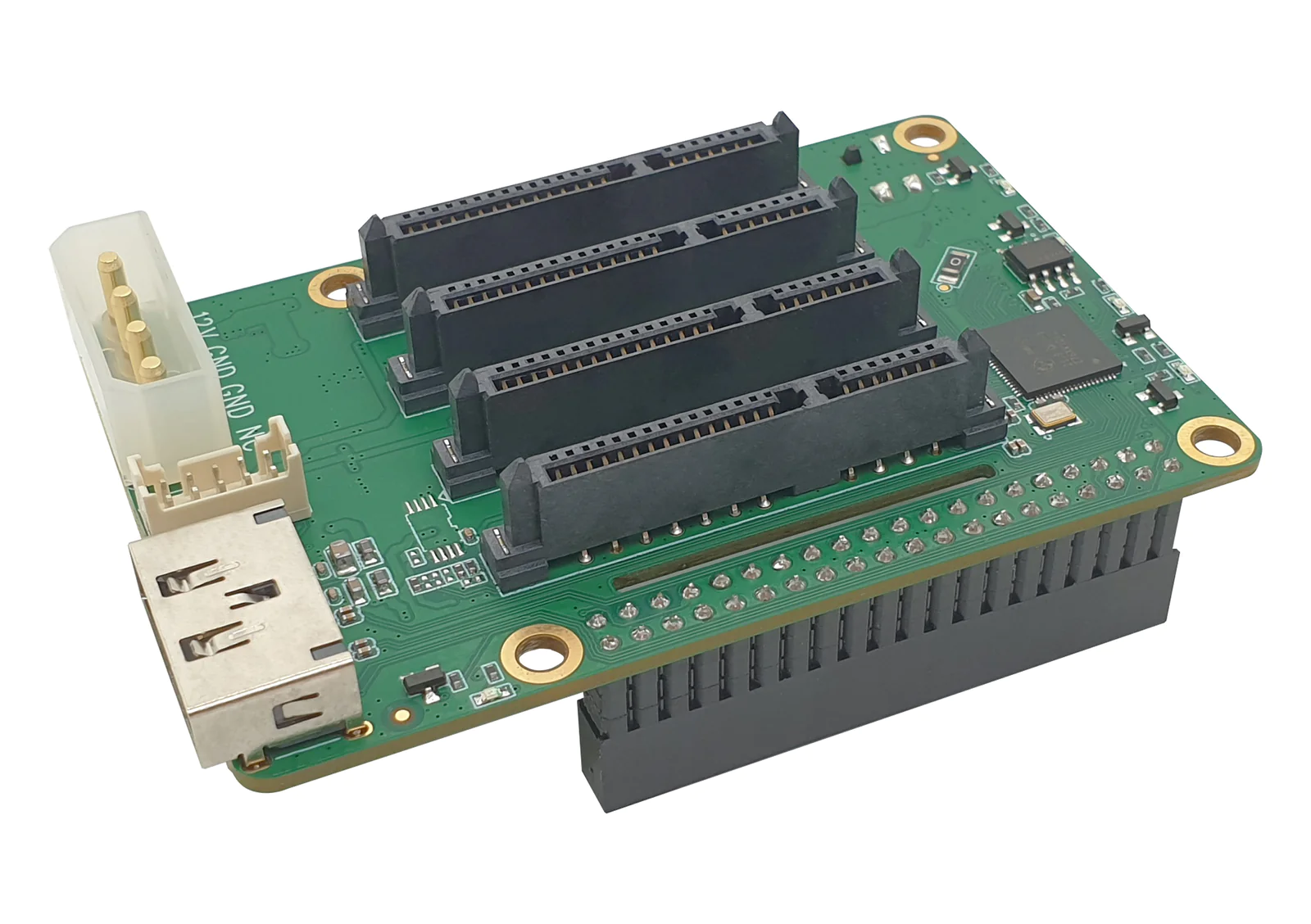
The Radxa Rock Pi 4B+ paired with its quad-bay SATA HAT is one of the best low-power, high-density NAS builds you can put together for under $250. You get four full-size 3.5″ drive bays, real gigabit Ethernet, USB 3.0 for backups, and quiet operation — all on a board the size of a deck of cards. Here is the exact build, OS, and configuration we use to run it 24/7.
Why the Rock Pi 4B+ for a NAS
For a four-drive NAS the bottleneck is rarely raw CPU — it is I/O, networking, and continuous uptime. The Rock Pi 4B+’s RK3399 SoC delivers two Cortex-A72 performance cores plus four A53 efficiency cores, which is plenty to drive Samba, NFS, and even Plex transcoding for a couple of streams. The board exposes a true PCIe 2.1 ×4 lane via the M.2 connector on the underside, and that is what the SATA HAT taps into to give all four drives independent, full-speed connections — no port multiplier, no USB-to-SATA bottleneck.
Compare that to a Raspberry Pi 4 with USB 3 SATA adapters: every drive shares one 5 Gbps USB bus, and UASP performance under sustained load is inconsistent. The Rock Pi 4B+ avoids the issue entirely.
What You Will Need
- Radxa Rock Pi 4B+ (4GB RAM minimum; 4GB is plenty for SMB/NFS/SnapRAID workloads)
- Radxa Quad SATA HAT (four 22-pin SATA connectors, PCIe to four-port SATA controller)
- Top metal enclosure with included 40mm cooling fan
- 12V/4A barrel-jack PSU (powers both the board and the spinning drives)
- Four 3.5″ SATA drives — we recommend matched WD Red Plus or Seagate IronWolf NAS drives
- microSD card (32GB Class 10 minimum) for the boot OS
- Optional: NVMe SSD for boot/cache (the HAT exposes a passthrough M.2 slot in some revisions)
Step 1 – Assemble the Hardware
Power off everything before assembly. Mount the Rock Pi 4B+ into the bottom of the metal enclosure with the four short standoffs. The SATA HAT connects via the underside M.2 connector — align it carefully and screw it down so the PCIe edge is flush. Slide each 3.5″ drive into the four bays; the HAT acts as both the SATA backplane and the power distribution board. Connect the 12V supply only to the dedicated barrel jack on the HAT — do not use the USB-C power on the Rock Pi itself, since the board will draw power from the HAT.
Finally, mount the 40mm fan to the top cover and connect its 2-pin lead to the fan header on the HAT. The fan runs at low RPM by default and is whisper quiet.
Step 2 – Flash the OS
Use the official Radxa Debian Bullseye CLI image — the desktop variant is unnecessary overhead for a headless NAS. Flash to a microSD card:
xzcat rock-pi-4b-plus-debian-bullseye-cli-arm64.img.xz | \
  sudo dd of=/dev/sdX bs=4M status=progress conv=fsync
First boot: default user is rock / password rock. Change the password immediately, set a static IP on your LAN, and run a full update:
sudo apt update && sudo apt full-upgrade -y
sudo apt install -y mdadm samba nfs-kernel-server smartmontools hdparm htop
Step 3 – Verify the SATA HAT
After reboot, all four drives should enumerate as /dev/sda through /dev/sdd. Confirm with:
lsblk -o NAME,SIZE,MODEL,SERIAL
sudo smartctl -a /dev/sda | head -30
If a drive is missing, reseat the SATA connector on the HAT — they are the smaller 22-pin combined data+power type and need to be fully seated. SMART should report all four drives in PASSED state.
Step 4 – Build a RAID Array
For most home NAS use cases we recommend RAID 5 across all four drives for 3× drive capacity with single-drive redundancy, or RAID 10 if write performance matters more than capacity. Create a RAID 5 array with mdadm:
sudo mdadm --create /dev/md0 --level=5 --raid-devices=4 \
  /dev/sda /dev/sdb /dev/sdc /dev/sdd

# Monitor the initial sync (takes 6-12 hours for 4 x 4TB):
watch -n 10 cat /proc/mdstat
Once the array is built, save the configuration so it auto-assembles on boot:
sudo mdadm --detail --scan | sudo tee -a /etc/mdadm/mdadm.conf
sudo update-initramfs -u
Step 5 – Format and Mount
Format with ext4 (best balance of stability and overhead on ARM) and mount at /srv/nas:
sudo mkfs.ext4 -L nas-pool /dev/md0
sudo mkdir -p /srv/nas
echo 'LABEL=nas-pool /srv/nas ext4 defaults,noatime 0 2' | sudo tee -a /etc/fstab
sudo mount -a
The noatime mount flag prevents access-time writes on every file read — a significant performance and SSD-longevity improvement.
Step 6 – Configure Samba for SMB Sharing
Create a share definition in /etc/samba/smb.conf:
[NAS]
  path = /srv/nas
  browseable = yes
  read only = no
  guest ok = no
  valid users = @nas-users
  create mask = 0664
  directory mask = 0775
Create the user group and add a Samba password for your user:
sudo groupadd nas-users
sudo usermod -aG nas-users rock
sudo smbpasswd -a rock
sudo systemctl restart smbd
The share is now reachable from any client at \\rockpi-nas\NAS (Windows) or smb://rockpi-nas/NAS (macOS/Linux).
Step 7 – Drive Health Monitoring
Spinning drives fail eventually. Enable SMART monitoring with email alerts:
sudo systemctl enable --now smartd
sudo nano /etc/smartd.conf
# Add:  DEVICESCAN -a -o on -S on -s (S/../.././02|L/../../6/03) -m you@example.com
Performance We Have Measured
On a four-drive WD Red Plus 4TB RAID 5 setup over gigabit Ethernet:
- Sequential read: 112 MB/s (line-rate saturated)
- Sequential write: 105 MB/s (line-rate saturated)
- Random 4K read: ~18 MB/s
- Idle power: ~14 W (drives spun down via
hdparm -S 120) - Full-load power: ~38 W
For most home networks the gigabit NIC will be the bottleneck long before the SATA HAT is. If you want to push further, the M.2 PCIe slot can be reallocated to a 2.5 GbE NIC instead of the SATA HAT — but then you give up the four-bay setup.
Optional: OpenMediaVault for a Web UI
If you want a graphical management interface instead of editing config files, install OpenMediaVault on top of your existing Debian:
wget -O - https://github.com/OpenMediaVault-Plugin-Developers/installScript/raw/master/install | sudo bashOMV detects the existing RAID and shares, and adds plugins for Plex, Nextcloud, rsync backups, and a slick web dashboard at http://rockpi-nas/.
Wrap-Up
For a fraction of the cost of a Synology DS423 or QNAP TS-433, this build delivers comparable raw throughput, full Linux flexibility, and significantly lower idle power draw. It is what we run as our shop’s parts-archive and build-server backup target — and what we recommend to customers who want a NAS they fully control.